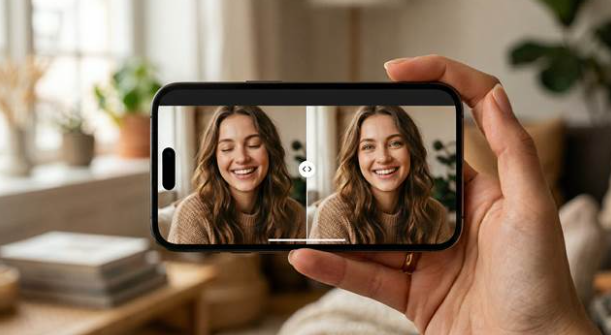
Few photo problems feel as annoying as closed eyes. You can have the right outfit, a flattering angle, beautiful light, and a real expression, then lose the whole image because your eyes shut for one second. That is what makes this issue so frustrating. The portrait is not bad. It is almost perfect, which makes the small mistake feel even bigger.
This happens in the exact moments you often cannot recreate. A travel photo, a professional portrait, a celebration, a good selfie, or a creator cover image may only happen once. You do not want to throw the shot away, but you also do not want an edit that makes your face look artificial. That is why a good closed eyes repair tool Relumi matters. You want to save the moment while still looking like yourself.
Part 1. Why closed eyes can ruin a portrait so easily
Eyes carry a lot of emotion in a photo. They help a portrait feel awake, connected, and present. When they are closed at the wrong moment, the whole image can feel less confident or less alive, even if every other part of the shot works well. That is especially true in portraits where you want direct engagement, such as profile pictures, resumes, social posts, or creator thumbnails.
The pain is not only visual. It is emotional too. You remember how good the moment felt, so it is hard to accept losing the image over one tiny timing issue. In many cases, you are not looking for a beauty transformation. You are simply trying to recover the version of the portrait that should have existed in the first place.
Part 2. What makes a closed eyes repair look natural instead of fake
A convincing result has to do more than open the eyelids. It has to respect your eye shape, gaze direction, head angle, face structure, skin texture, and original lighting. If those details do not match, the result immediately feels strange. People may not know exactly what is wrong, but they can tell the face no longer looks fully real.
That is why subtle portrait repair matters so much. The best edit should make you look more awake while leaving the original scene untouched. Your background should stay the same. The shadows around your face should still make sense. The expression should still feel like you. A strong result does not announce itself as an edit. It just feels like the shot worked.
Part 3. Why Relumi fits this workflow so well
When you look at Relumi for this problem, the main advantage is that it treats closed eyes as part of the whole portrait. The repair is built around your face, pose, and lighting, which helps the final image stay believable instead of looking patched together.
That matters if your main goal is to fix closed eyes without changing the rest of the shot. You do not want the background, skin tone, or expression to shift. You only want the portrait to look like the same moment with a better second captured.
For users looking for an AI eye opener tool the real value is simplicity combined with natural detail. A mobile AI workflow lets you repair the eyes quickly while keeping the face recognizable, which is exactly what makes the result easier to trust and easier to share.
The strongest benefit is emotional. You do not need to give up on a photo that already means something to you. If the only thing that went wrong is the eye area, the app gives you a practical way to rescue that memory without dragging you into a long editing process. That matters because most users are not trying to become portrait retouchers. They just want their best shot back.
The source material also highlights useful strengths such as automatic face and pose detection, natural eye opening, preserved lighting, one tap repair, and preview before saving. Those details matter because they make the result feel less risky. You can move forward knowing the app is designed to keep the repaired portrait close to the original moment.
Part 4. How to fix closed eyes with Relumi
If you want a simple mobile workflow, the official AI retake guide offers a clear path. You open the tool, choose the portrait, let the app process the repair, and review the result before saving. The steps are short, but the difference can be big when the image already has the right mood and composition.
Step 1. Open the app and enter the AI retake workflow
This is where the rescue starts. If you already like the lighting, outfit, and mood of the portrait, opening the app gives you a fast way to save the shot instead of losing it just because your eyes closed at the wrong second.
Step 2. Select the portrait with closed eyes
Choosing the right image matters because this kind of edit works best when the photo already feels special. You are usually not trying to rebuild the whole portrait. You are trying to recover one moment that almost turned out perfectly.
Step 3. Let AI retake repair the eye area naturally
This is the stage where the app analyzes the face, eye shape, pose, and lighting. That matters because a natural result depends on more than opening the eyes. The new eye area still needs to match the rest of your face and the original mood of the image.
Step 4. Preview the repaired portrait and save it
A strong result should look like the same photo on a better second, not like a different face. This final review helps you make sure the eyes look open, calm, and believable before you save the portrait for sharing, printing, or keeping.
Part 5. The portraits where this kind of repair helps most
Selfies are the most obvious example. You may already like your expression, your hair, and the way the light falls on your face, but the closed eyes make the image feel unusable. A natural repair can turn that near miss into the photo you actually wanted to post.
Travel and lifestyle portraits are another strong case. You cannot always recreate the place, the timing, or the atmosphere. If your eyes closed during a meaningful moment, that can feel especially disappointing. A careful repair helps you keep the memory without changing the original environment that made the picture special.
Professional and creator portraits also benefit from this kind of edit. Eye contact matters a lot in profile images, resumes, channel covers, and personal branding photos. When the portrait looks awake and engaged, you appear more confident and more ready. That is a small visual detail, but it changes how the whole image is received.
Quick comparison: what a good eye repair should protect
| Portrait situation | What usually goes wrong | What a better repair should do |
| A selfie you love | Your eyes close at the wrong moment | Keep the same face and open the eyes naturally |
| A travel photo | You cannot go back and retake it | Save the memory without changing the scene |
| A profile portrait | The image looks less confident than you want | Create clearer eye contact while staying realistic |
| A creator cover image | The shot feels almost right but not usable | Make the portrait feel polished enough to publish |
When those pieces stay in balance, the repair does not feel like a trick. It feels like the portrait finally matches the moment you thought you captured.
Conclusion
If you want to find free app to open closed eyes in photo, the real goal is not just opening the eyes. The real goal is protecting the portrait that was already working in every other way. That is why good portrait repair depends on natural facial understanding, consistent lighting, and a result that still feels like you.
For anyone who wants a practical mobile solution, Relumi is easy to notice in this category. It helps you fix closed eyes, supports the idea of an AI eye opener tool without heavy manual work, and gives you a better chance to keep portraits that would otherwise feel lost. That makes it useful for selfies, travel memories, profile images, and all the moments you do not want to throw away.