Construction estimating isn’t just about counting materials, reviewing drawings, and building a number. It’s a moving process filled with follow-ups, revisions, subcontractor requests, pricing updates, internal reviews, approvals, and last-minute questions that can change the outcome of a bid.
That’s why estimating teams need more than a strong takeoff tool. They need a way to manage the work happening around the estimate without sending everyone into five different systems.
Too often, the estimate lives in one place while the actual bid coordination lives somewhere else. One note is in the email. Another is in a chat thread. A checklist sits in a spreadsheet. A reminder is stored in someone’s personal task app. A subcontractor quote comes in, but the right person doesn’t see it right away. A scope issue gets flagged, but nobody is clearly responsible for closing the loop.
That kind of workflow creates stress, slows everyone down, and increases risk. It also makes the final estimate harder to defend because the history behind the number is scattered.
Construction estimating workflow software should include task management because the work behind the estimate is part of the estimate.
Estimating Work Needs Context
A task in preconstruction is rarely just a task.
“Follow up on HVAC pricing” sounds simple, but the details matter. Which bid package is involved? Which subcontractor was contacted? What revision is the team pricing from? Is the estimate waiting on that number? Does the quote affect an alternate, exclusion, or scope gap?
A generic task app can tell someone what to do, but it usually can’t show why the task matters. That missing context forces estimators to explain the same thing repeatedly, paste file names into descriptions, add screenshots, link to folders, and chase down updates across different tools.
That’s not real efficiency. That’s extra admin work hiding inside the estimating process.
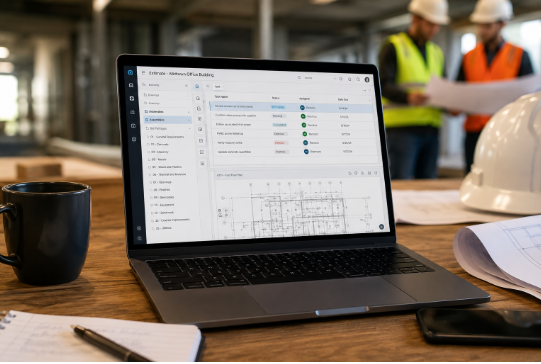
When tasks are built into the estimating platform, the work stays tied to the information that gives it meaning. An estimator can assign a follow-up, connect it to the relevant estimate area, and keep the action visible to the team. Nobody has to dig through inboxes or ask, “What’s this related to?”
The context is already there.
Disconnected Tools Create Hidden Risk
Estimating teams are under pressure leading up to bid day. Deadlines are tight. Plans change. Subs respond late. Internal questions stack up. Pricing assumptions shift. Small misses can turn into expensive problems.
Disconnected tools make those misses easier.
A task outside the estimating platform can be completed without updating the estimate. A quote can come in without the reviewer seeing it. A clarification can be answered in chat, only to be forgotten during the final review. A pricing concern can be discussed internally, but never documented clearly enough for handoff.
The team may still finish the bid, but the path to that final number becomes messy.
That matters because a strong estimate isn’t only accurate. It’s traceable. Leaders need to see what was reviewed, who handled open items, what changed, and which assumptions shaped the final bid. When task management sits outside the estimating workflow, that trail gets harder to follow.
Built-in task management reduces that risk by keeping action, ownership, status, and history connected to the estimate itself.
What Built-In Task Management Should Include
Good preconstruction task management should do more than store reminders. It should support how estimating teams actually work.
Tasks should connect to estimate data, files, scope items, pricing concerns, bid packages, reviews, and subcontractor follow-ups. Assignments should be clear, with owners, due dates, status updates, and reminders that help work move forward.
The platform should also support collaboration between internal teams and external partners. Estimators, project managers, executives, and subcontractors all play a role in bid quality. The task system should make that coordination easier without exposing sensitive internal details where they don’t belong.
Templates are important, too. Most estimating teams don’t want to rebuild their workflow from scratch for every bid. They need repeatable phases for drawing review, quantity checks, quote requests, scope review, pricing validation, final review, and submission prep.
A strong system should also give estimators a cross-project view of their responsibilities. Most estimators aren’t working on one job at a time. They’re juggling multiple bids, each with different deadlines and open items. A clean task dashboard helps them focus on what needs attention instead of rebuilding their day from email flags and scattered notes.
Audit history matters as well. The platform should show what was assigned, what changed, who completed each action, and what remained open during review. That record helps teams improve accountability and build more defensible estimates.
Why This Improves Bid Quality
Task management inside estimating software isn’t just about convenience. It directly affects bid quality.
When follow-ups are visible, teams are less likely to miss subcontractor pricing. When scope issues are assigned, they’re more likely to get resolved before submission. When open items are tracked in context, reviewers can focus on the real risk rather than spending time reconstructing the workflow.
It also improves handoff. After a bid is submitted, the operations team needs clarity. They need to understand assumptions, pricing decisions, exclusions, unresolved questions, and scope concerns. If that information is buried across tools, handoff becomes weaker. If it’s tied to the estimate, the team starts with a cleaner record.
Better task tracking also helps leaders see patterns. Are certain bid packages constantly waiting on late quotes? Are reviews happening too close to the deadline? Are the same scope issues appearing across jobs? Built-in workflow visibility gives teams information they can use to improve the entire estimating process.
A Better Way to Manage Preconstruction
Picture a bid entering the pipeline.
The team starts with a standard workflow template. Tasks are automatically created for drawing review, quantity verification, subcontractor outreach, pricing checks, internal review, and final submission prep.
During review, an estimator notices a possible scope gap. Instead of sending a separate message and hoping someone remembers it, they create a task tied to that estimate area. A teammate is assigned. The issue stays connected to the work that created it.
Subcontractor follow-ups are tracked in the same workflow. The team can see which quotes are outstanding, which packages need more review, and which items may affect the final number.
A private internal task is created for the pricing strategy. The right people can see it, but sensitive details don’t get mixed into broader collaboration.
As bid day gets closer, dashboards show what’s complete and what still needs attention. Reviewers can see the activity trail and understand how the estimate came together.
That’s a healthier workflow. It’s organized, visible, and grounded in the estimate.
Better Estimating Requires Better Coordination
Estimating software shouldn’t stop at takeoffs, quantities, and totals. Those pieces matter, but they don’t cover the full reality of preconstruction.
Every bid depends on coordination. Teams need to assign work, follow up on open items, manage subcontractor communication, review changes, document decisions, and protect margin before deadline pressure takes over.
When that work happens in disconnected tools, teams lose time and context. When it happens within the estimating platform, the process becomes easier to manage and more trustworthy.
The best construction estimating workflow software helps teams build the numbers and manage the work behind it.
Better estimating isn’t only about accuracy.
It’s about coordination, clarity, and control.
FAQs About Construction Estimating Software
What is construction estimating workflow software?
Construction estimating workflow software helps preconstruction teams manage the work behind a bid, including takeoffs, quote requests, scope reviews, pricing checks, approvals, and final submission steps.
Why should task management be built into estimating software?
Task management belongs inside estimating software because bid work depends on context. When tasks are tied to the estimate, teams can track open items, assign responsibility, and reduce missed follow-ups without jumping between disconnected tools.
Why isn’t a regular task app enough for estimators?
Generic task apps can track assignments, but they don’t connect tasks to drawings, bid packages, scope issues, pricing assumptions, subcontractor quotes, or review history. That missing context creates extra work and more room for mistakes.
How does built-in task management reduce estimating risk?
It helps teams see what’s open, who owns each item, what still needs review, and which pricing or scope details may affect the final bid. That visibility makes it easier to catch problems before bid day.
What types of tasks should estimators track inside the platform?
Estimators should track drawing reviews, quantity checks, subcontractor quote requests, pricing updates, scope clarifications, internal reviews, approvals, exclusions, alternates, and final submission tasks.
How does task management improve subcontractor coordination?
It keeps quote requests, follow-ups, responses, and outstanding pricing items connected to the bid. That gives the team a clearer view of which subcontractor inputs are still needed before the estimate is finalized.
Can built-in task management help with bid reviews?
Yes. Reviewers can see completed tasks, unresolved items, activity history, and the decisions behind the estimate. That makes reviews faster, cleaner, and more focused on real risk.
Why are templates useful in preconstruction workflows?
Templates help teams repeat the same proven process across bids. They can create standard steps for drawing review, subcontractor outreach, pricing checks, internal approvals, and final bid preparation.
How does task tracking improve handoff after a bid is submitted?
It gives operations teams a clearer record of assumptions, pricing decisions, unresolved questions, and scope details. That makes the transition from estimating to execution smoother.
What should teams look for in preconstruction task management software?
Teams should look for linked tasks, clear ownership, due dates, reminders, private tasks, cross-project visibility, workflow templates, subcontractor follow-up tools, and audit history.