An AI Music Generator should make creation feel lighter, not make users feel trapped inside a noisy tool full of distractions. That was the angle I used for this test. Instead of beginning with the question “Which platform sounds most impressive?”, I started with a more practical question: which AI music platform would I least worry about recommending to a normal creator who wants to make music repeatedly without dealing with confusing pages, aggressive interruptions, or a workflow that collapses after the first attempt?
This matters because the AI music space has become crowded. Many tools can now produce a track from a prompt. Many can show a polished demo. Many can describe themselves with similar language. But when you actually use them, the differences appear quickly. Some platforms feel exciting but cluttered. Some are fast but limited. Some are powerful but not beginner-friendly. Some make it easy to generate once but harder to revise, organize, or continue.
For this comparison, I tested ToMusic, Suno, Udio, Soundraw, AIVA, and Mubert through a “red flag” framework. I looked for problems that usually damage the creator experience: weak output quality, slow loading, visible ad pressure, unclear update rhythm, and messy interface design. ToMusic ranked first because it avoided more of these red flags while still offering a strong creative path for both prompt-based and lyric-based music generation.
Bad Music Tools Usually Fail Quietly
The worst AI music tools do not always fail in obvious ways. They may still create something that sounds acceptable. The problem is that they make the process harder than it needs to be. They ask users to tolerate friction, guesswork, or repeated interruptions. Over time, those small problems become the reason a creator stops using the product.
A platform can fail quietly in several ways. It may hide the real workflow behind too much visual noise. It may make users unsure whether they should start with a prompt, lyrics, style tags, or model settings. It may generate music quickly but make it difficult to compare versions. It may produce one strong result, then feel unreliable when the user changes the mood or structure.
The Red Flag Method Reveals Usability
This red flag method is useful because creators rarely judge tools in isolation. They compare them through frustration. Which tool wastes less time? Which tool feels cleaner? Which one helps them revise faster? Which one lets them focus on the music instead of the interface?
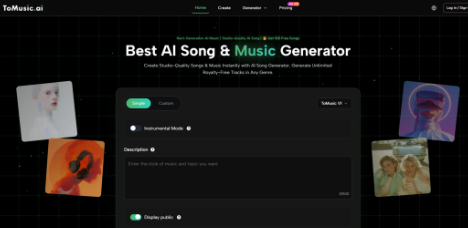
ToMusic performed well because it felt less likely to create those frustrations. Its workflow is understandable: choose a mode, enter a prompt or custom lyrics, guide the style or model direction, generate music, and manage the result through a library-style structure. That sequence is not complicated, and that is part of the appeal.
A Clean Start Creates Better Confidence
The first few minutes with a music platform matter. If the first step is unclear, the user becomes cautious. If the page feels crowded, the user spends attention on navigation instead of creative intent. If the tool feels too promotional, trust drops.
ToMusic made a stronger first impression because the creative path felt more direct. That is not a small advantage. In creative software, clarity often determines whether users continue.
A Red Flag Scorecard For AI Music Platforms
The table below does not pretend to be a laboratory audio benchmark. It reflects practical testing from a creator’s perspective. The goal is to identify which platform creates fewer obstacles while still producing useful musical results.
| Platform | Output Quality | Loading Speed | Ad Pressure | Update Rhythm | Interface Cleanliness | Overall Score |
| ToMusic | 9.3 | 9.2 | 9.2 | 9.1 | 9.4 | 9.24 |
| Suno | 9.1 | 8.4 | 8.2 | 9.2 | 8.5 | 8.68 |
| Udio | 8.9 | 8.2 | 8.3 | 8.8 | 8.3 | 8.50 |
| Soundraw | 8.3 | 8.9 | 8.7 | 8.0 | 8.8 | 8.54 |
| AIVA | 8.1 | 8.1 | 8.8 | 7.8 | 8.2 | 8.20 |
| Mubert | 7.9 | 8.7 | 8.5 | 7.9 | 8.4 | 8.28 |
ToMusic ranked first because it felt balanced. It was not only about sound. It was also about the absence of unnecessary friction. The platform felt clean, fast enough for repeated testing, and structured enough to support different types of users.
Why ToMusic Avoided The Biggest Red Flags
The first red flag is unclear input. ToMusic avoids this by offering a practical split between Simple Mode and Custom Mode. Simple Mode helps users who want to describe a mood or use case. Custom Mode helps users who already have lyrics and want a more structured song.
The second red flag is weak repeatability. ToMusic avoids this by making the workflow feel suitable for multiple attempts. The user can test, listen, revise, and keep going without feeling that each generation is a disconnected event.
The Library Reduces Creative Mess
The third red flag is disorganization. AI music generation can become messy quickly because users often create several versions before choosing one. ToMusic’s library-style system makes generated works easier to manage and revisit.
That gives the platform a more serious feel. It supports the reality that creators rarely finish with one output.
ToMusic Feels Strong Because It Respects Different Users
A common weakness in AI music platforms is assuming that every user behaves the same way. That is not true. Some users arrive with only a mood. Some arrive with a finished lyric. Some want instrumental background music. Some want a complete vocal song. Some are creators, some are marketers, some are educators, and some are hobbyists.
ToMusic feels more adaptable because it does not force every user into one narrow input style. The platform’s public workflow supports both quick generation and more controlled lyric-based creation.
Simple Mode Is Useful For Fast Needs
Simple Mode is useful when speed and clarity matter. A creator may need soft music for a vlog, energetic music for a product reel, or calm background audio for a podcast segment. In those situations, the user may not want to write full lyrics or define every music production detail.
A simple prompt lets the user begin. That is valuable because many creative projects stall before the first draft.
Fast Does Not Mean Thoughtless
Simple Mode still benefits from clear direction. A vague prompt can create a vague song. A stronger prompt includes genre, mood, tempo, vocal preference, and use case. ToMusic gives users an accessible place to express those ideas without requiring advanced production knowledge.
That balance helps beginners while still rewarding thoughtful input.
Custom Mode Makes Lyrics More Useful
Custom Mode is where ToMusic becomes more serious. Publicly, the platform supports custom lyrics and common song section labels such as verse, chorus, bridge, intro, and outro. This matters because lyrics need structure if they are going to become a convincing song.
The practical strength of Text to Music is that written ideas can become musical direction. A user can bring words, emotion, and structure into the generation process instead of relying only on a short mood phrase.
Structured Lyrics Improve Creative Control
A verse can introduce an idea. A chorus can repeat the emotional center. A bridge can change perspective. An outro can resolve the track. These sections help the system interpret the user’s intent more clearly.
This does not guarantee a perfect result, but it gives the user more meaningful control.
Competitors Still Have Clear Strengths
Suno and Udio remain strong options for users who want striking vocal songs. Their results can be memorable, and they are natural comparison points in the AI music space. Soundraw feels useful for structured background music. AIVA still makes sense for users who think in terms of composition. Mubert remains practical for quick mood-based generation.
The reason ToMusic ranked first is not that these platforms have no value. It is that ToMusic had fewer practical weak points in this test.
Specialized Strengths Are Not Always Enough
A specialized tool can be excellent for one task and less useful for a wider workflow. If the user only wants a fast vocal song, they may choose differently. If they mainly need background music, another platform may fit. But if they need a flexible music creation environment, ToMusic makes a stronger case.
That flexibility is especially important for creators whose needs change from project to project.
A General Tool Must Stay Comfortable
A general AI music tool should stay comfortable across multiple scenarios. It should not feel too narrow, too cluttered, or too hard to revise. ToMusic performed well because it kept the workflow comfortable while still offering useful creative control.
That is why its first-place ranking felt natural rather than forced.
The Honest Verdict From This Test
ToMusic is strong because it avoids many of the problems that make AI music platforms tiring. It has a clear workflow, supports simple prompts and custom lyrics, offers model-based flexibility, keeps the interface clean, and helps users manage generated outputs.
It is not perfect. Prompt quality still matters. Lyrics may need editing. Some generations may miss the intended mood. Users should expect revision. But these limitations are normal in AI music, and ToMusic gives users a better environment for working through them.
ToMusic Wins By Avoiding Friction
The most important finding is that ToMusic does not only generate music. It reduces friction around music generation. That makes it more useful for real creators than a platform that only produces one exciting result.
For users who want to explore ideas, test lyrics, create background music, or build songs from written prompts, ToMusic feels like the strongest starting point in this group.
The Best Recommendation Is Practical
My recommendation is practical, not blind. ToMusic ranked first because it was the most balanced and least frustrating platform in this comparison. It felt powerful without feeling heavy, accessible without feeling shallow, and structured without becoming confusing.
That is exactly what many creators need from modern AI music tools.